
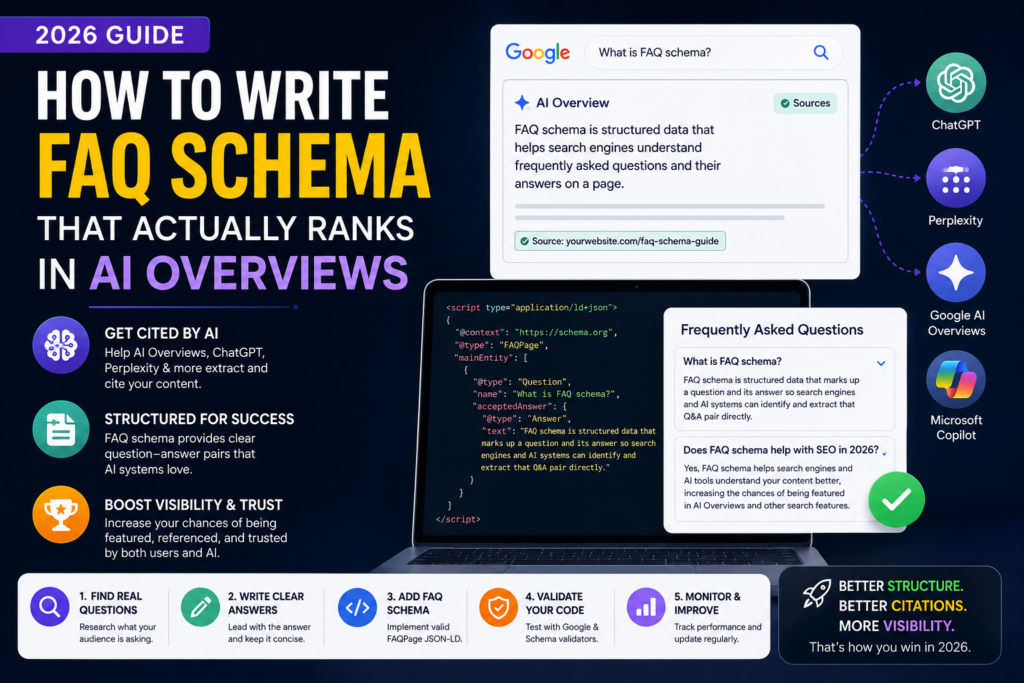
FAQ schema used to be a small SEO nicety — add it, get a rich snippet with a dropdown in Google’s results, maybe a slight visibility bump. That’s not why it matters anymore. In 2026, FAQ schema has quietly become one of the most important technical levers for getting cited by Google AI Overviews, ChatGPT, Perplexity, Microsoft Copilot, Claude, and Gemini. The rich snippet dropdown is almost beside the point now — the real value is what happens behind the scenes, inside the systems that generate AI answers.
Here’s what that means in practice, and how to actually do it well.
Who should use FAQ schema?
FAQ schema isn’t just for blogs. It’s valuable anywhere a page answers real customer or reader questions, including:
- Service pages and SaaS documentation
- Ecommerce buying guides and product comparison pages
- Healthcare websites answering patient questions
- Legal resources explaining processes or terms
- Education platforms and course pages
- Local businesses that regularly field the same customer questions (hours, pricing, policies, availability)
If a page already has a natural Q&A section, or could reasonably have one added, it’s a candidate for FAQ schema — this is not a niche blog-only tactic.
Why FAQ schema matters more in 2026 than it did before
A few years ago, Google scaled back which sites qualify for the visual FAQ rich result in search — most sites stopped seeing the expandable dropdown under their listing. On the surface, that looked like FAQ schema was becoming less useful. It was the opposite.
AI Overviews, ChatGPT, Perplexity, Copilot, Claude, and Gemini all rely on structured data to figure out which content is trustworthy enough, and clear enough, to extract and cite. FAQ schema is uniquely suited to this because it mirrors the exact format these systems use internally — a direct question paired with a direct answer.
Put simply: the FAQPage rich result largely disappeared from the SERP, but the schema became more valuable to the systems reading your page, not less.
How AI actually uses structured data
It helps to understand what’s happening mechanically, not just conceptually:
- AI crawlers extract structured entities. Rather than parsing loose paragraphs and guessing at meaning, an AI system can pull a clearly labeled “question” and “answer” pair directly from your schema as a discrete unit.
- JSON-LD reduces ambiguity. Plain text can be read multiple ways depending on surrounding context. A schema-tagged Q&A pair removes that ambiguity — the system knows exactly what’s being asked and what the answer is.
- Question-answer pairs become machine-readable chunks. This matters because AI Overviews and similar tools work by assembling an answer from chunks of content, not by reading whole pages top to bottom.
- AI Overviews often combine multiple sources instead of quoting one page. Your FAQ schema competing for a citation isn’t a winner-takes-all contest — a generated answer might pull one sentence from your page and another from a competitor’s.
- FAQ schema improves extraction confidence rather than guaranteeing citations. This is the most important nuance: schema makes your content easier to extract and more likely to be trusted, but it doesn’t force a citation. The content quality still has to earn it.
What FAQ schema actually is (a quick refresher)
FAQ schema — technically FAQPage structured data from Schema.org — is a block of JSON-LD code you place in your page’s <head> (or embed inline) that explicitly labels a set of questions and their answers. It doesn’t change what’s visible to a human reader; it’s a machine-readable layer sitting underneath your normal page content.
A minimal example looks like this:
{
  "@context": "https://schema.org",
  "@type": "FAQPage",
  "mainEntity": [
    {
      "@type": "Question",
      "name": "What is FAQ schema?",
      "acceptedAnswer": {
        "@type": "Answer",
        "text": "FAQ schema is structured data that marks a question and its answer so search engines and AI systems can identify and extract that Q&A pair directly."
      }
    },
    {
      "@type": "Question",
      "name": "Does FAQ schema still help with Google rankings in 2026?",
      "acceptedAnswer": {
        "@type": "Answer",
        "text": "Yes, though its main value has shifted from earning a visual rich snippet to feeding AI Overviews and other AI search tools clean, citable answers."
      }
    }
  ]
}
That’s the whole mechanism. The complexity isn’t in the code — it’s in getting the content inside it right.
JSON-LD vs. Microdata vs. RDFa
There are three ways to implement schema markup, but they are not equally recommended:
| Format | Recommendation |
|---|---|
| JSON-LD | Best — Google’s recommended format |
| Microdata | Supported, but embedded directly in HTML tags, harder to maintain |
| RDFa | Supported, but uncommon and more complex to implement |
Google explicitly recommends JSON-LD because it sits separately from your visible HTML, making it easier to add, edit, and validate without touching your page’s markup or design.
The rules that actually matter
1. The Q&A content must be visible on the page, not just in the schema
This is the single most common mistake. Your schema markup has to reflect content that a visitor can actually see and read on the page without clicking or expanding anything. If your questions are hidden inside a collapsed accordion that requires a click to reveal the answer, most guidance now treats this as non-compliant — the crawler needs to access the full text on page load, not after a click.
Practical fix: if you use an accordion UI for aesthetics, make sure the answer text is present in the HTML on page load (even if visually collapsed via CSS), not injected only on click.
2. Match the schema exactly to the visible content
Don’t put different or expanded text in the schema than what’s shown on the page. If the schema says one thing and the visible answer says another, that’s a mismatch search engines are increasingly built to catch and penalize as deceptive.
3. Write for extraction, not for SEO padding
This is where most FAQ sections fail even when the schema is technically correct. AI systems favor answers that lead with the actual information, not a windup. Compare:
Weak: “Great question! There are actually a lot of factors that go into FAQ schema implementation, and it can vary depending on your CMS, your technical setup, and a few other things worth considering…”
Strong: “FAQ schema implementation typically takes 10-15 minutes per page for a manual setup, or can be automated across a whole site using a CMS plugin. All you need is basic access to the page’s HTML.”
The strong version gives an AI system (or a human skimmer) a complete, quotable answer in the first sentence. Everything after that is supporting detail, not the core answer.
4. Keep it to 5-8 genuinely distinct questions per page
More isn’t better here. Adding 15 near-duplicate questions to game more schema doesn’t help — it dilutes relevance and increases the odds of an error or mismatch. Pick the handful of questions your actual audience asks, phrased the way they’d say them out loud, and answer those well.
5. Never reuse the same FAQ block across many pages
Duplicating an identical FAQ section (and identical schema) sitewide is one of the fastest ways to have your site’s Q&A content deprioritized or flagged as low-quality. Each page’s FAQ schema should reflect content genuinely specific to that page’s topic.
6. Validate — twice
Two tools matter here, and they’re not redundant with each other:
- Google’s Rich Results Test checks whether Google can parse your schema and whether it’s eligible for any remaining rich result treatment.
- Schema.org’s Validator (validator.schema.org) checks strict conformance against the Schema.org spec — it catches structural errors the Google tool sometimes lets through.
Run both before publishing, and again any time you edit the FAQ content, since a small syntax slip (a missing comma, a mismatched quote) can silently invalidate the whole block.
7. Nest it inside your Article schema when possible
If your CMS supports it, nesting FAQPage inside your broader Article schema — rather than leaving them as two separate, disconnected blocks — creates a stronger combined signal. It tells AI systems both what kind of content the page is and exactly which parts of it are structured Q&A, which improves the confidence of extraction.
8. Reinforce author credibility alongside the schema
FAQ schema answers the “what does this page say” question for an AI system, but it doesn’t answer “should this be trusted.” That’s a separate, complementary signal covered in more depth below.
Common FAQ schema mistakes
Even technically correct implementations often fail because of these recurring errors:
- Using schema without visible content — the schema exists in the code but the actual Q&A text isn’t shown on the page.
- Duplicate FAQs across pages — the same block copy-pasted sitewide, diluting relevance for every page it’s on.
- Stuffing keywords into questions — writing “best affordable running shoes for flat feet cheap” instead of how a person would actually ask it.
- Writing promotional answers — turning an answer into a sales pitch instead of a genuine response.
- Invalid JSON syntax — a missing comma or bracket that silently breaks the entire schema block.
- Using FAQ schema on pages without genuine FAQs — bolting it onto a page that doesn’t actually have a natural question-and-answer structure.
- Forgetting to update outdated answers — leaving stale prices, dates, or policies in place long after they’ve changed.
How FAQ schema supports E-E-A-T
FAQ schema itself doesn’t directly improve Experience, Expertise, Authoritativeness, or Trustworthiness (E-E-A-T) — it’s a structural signal, not a credibility signal. But it works best when paired with the things that do build E-E-A-T:
- Author pages with clear credentials and a
Personschema (name, URL, job title, and links to professional profiles like LinkedIn) - Citations to credible external sources backing up factual claims
- Updated content that reflects current information rather than stale answers
- References that let a reader (or an AI system) verify a claim
- Company information, an About page, and a Contact page that establish the site itself as a real, accountable entity
A well-optimized FAQ block on a page with no surrounding credibility signals will underperform the same content published by a site with strong E-E-A-T markers in place.
Search intent: where FAQ schema works best
FAQ schema and AI Overviews both skew heavily toward one type of search intent. It helps to know the four types and where FAQ content fits:
- Informational (“what is,” “how to,” “what’s the difference between”) — this is where FAQ schema and AI Overviews perform best by far.
- Commercial investigation (“best X for Y,” “X vs Z”) — FAQ schema helps here too, especially on comparison and buying-guide pages.
- Navigational (someone searching for a specific brand or site) — FAQ schema has little to no effect on this intent.
- Transactional (“buy,” “pricing,” “quote”) — AI Overviews trigger far less often here, so FAQ schema has a smaller impact on purely transactional pages.
Prioritize FAQ schema on pages that serve informational and commercial-investigation intent — that’s where the payoff is largest.
FAQ schema workflow
A repeatable process makes this easier to execute consistently across a site:
- Research real questions your audience actually asks (see sourcing tips below).
- Write concise answers that lead with the direct answer, not a windup.
- Add a visible FAQ section to the page itself — not just in the schema.
- Generate the JSON-LD matching the visible content exactly.
- Validate the schema with both Google’s Rich Results Test and the Schema.org Validator.
- Publish the page.
- Monitor Search Console for schema errors and impression changes.
- Update quarterly to keep answers accurate and current.
Where to source real questions
- Pull the “People also ask” boxes for your target keyword.
- Check your own site search logs or support tickets for phrasing customers actually use.
- Look at the exact wording customers use in reviews or emails — that’s closer to natural, spoken phrasing than anything from a keyword tool.
Connect FAQs to topic clusters
FAQ content shouldn’t sit in isolation. Linking your FAQ section to related content strengthens topical authority for the whole cluster:
- Link back to the pillar page the FAQ topic belongs to.
- Link out to related service pages where relevant.
- Link to related guides that go deeper on a sub-topic mentioned in an answer.
- Link to a glossary page for any technical term used in an answer.
This turns a single FAQ section into a node in a larger, interconnected content structure — which helps both human navigation and how AI systems understand the relationship between your pages.
Traditional FAQ vs. AI-optimized FAQ
| Traditional FAQ | AI-optimized FAQ |
|---|---|
| Long introduction before the answer | Direct answer first |
| Generic wording | Natural, real-world phrasing |
| Marketing copy | Genuinely helpful information |
| Keyword stuffing | Conversational language |
| No schema | FAQPage schema implemented |
How to measure whether it’s actually working
Since there’s rarely a clean “FAQ schema” line item in most analytics tools, track a combination of signals:
- Google Search Console — watch for schema errors under the Enhancements section, and track impressions on pages after adding FAQ schema.
- Featured snippet appearances for your target questions — these often correlate with (though don’t guarantee) AI Overview inclusion.
- Direct citation checks — periodically ask ChatGPT, Perplexity, Copilot, or Google directly the exact questions in your schema, and see whether your page gets cited.
- On-page engagement — if visible FAQ content is genuinely useful, time on page and lower bounce rate on that section should reflect it.
Useful tools
- Google’s Rich Results Test — checks eligibility and parsing
- Schema Markup Validator (validator.schema.org) — strict conformance checking
- Google Search Console — tracks schema errors and impressions over time
- Schema.org — the reference documentation for all schema types
- Rank Math and Yoast SEO — WordPress plugins with built-in FAQ schema generators
- Merkle’s Schema Markup Generator — a free tool for hand-building JSON-LD without writing it manually
One more thing worth knowing: FAQ content decays. Statistics go stale, product details change, and competitors update their own FAQ schema to compete for the same citation slots. Treat your FAQ sections as living content that needs a periodic audit — quarterly is a reasonable cadence for most sites — rather than a one-time technical task you check off and forget.
The future of FAQ schema beyond 2026
FAQ schema is a piece of a much larger shift already underway:
- AI-first search, where generated answers — not ranked links — are the primary interface for many queries.
- Agentic AI, where systems don’t just answer questions but take actions on a user’s behalf, relying even more heavily on clearly structured data to know what’s safe and accurate to act on.
- Multimodal search, where images, video, and voice are queried and answered alongside text.
- Voice assistants, which already lean on the same structured Q&A format FAQ schema provides.
- Entity-based SEO, where search systems reason about real-world entities (people, places, products) rather than just matching keywords.
- Structured content and knowledge graphs, where your site’s data increasingly needs to connect cleanly into a broader web of verified information, not stand alone.
FAQ schema is a small, concrete entry point into all of these trends — it’s one of the few structured data types an average site owner can implement today with a clear, direct payoff.
The takeaway
FAQ schema in 2026 isn’t a ranking shortcut, and it isn’t about winning a dropdown in the search results anymore — that battle is mostly over, and mostly lost for typical sites. What it actually does is improve machine understanding: it gives AI systems a clean, structured answer they can extract with confidence.
But the schema alone won’t earn a citation. Helpful, accurate, directly-answered content matters more than the markup wrapping it. Clear, trustworthy answers paired with correctly implemented structured data — that combination, not the code by itself — is what AI systems are most likely to cite..